Colors Names | The Ultimate Guide with Colors, Shades, HEX Codes, RGB Values & Color Categories
Colors Names | The Ultimate Guide with Colors, Shades, HEX Codes, RGB Values & Color Categories
Color names help you identify, compare, and utilize colors across your designs, websites, brands, graphics, and digital products. A useful color reference is more than just a collection of attractive "color swatches"; it links a recognizable name to a specific color value, making it easier to identify a color and reuse it across different projects.
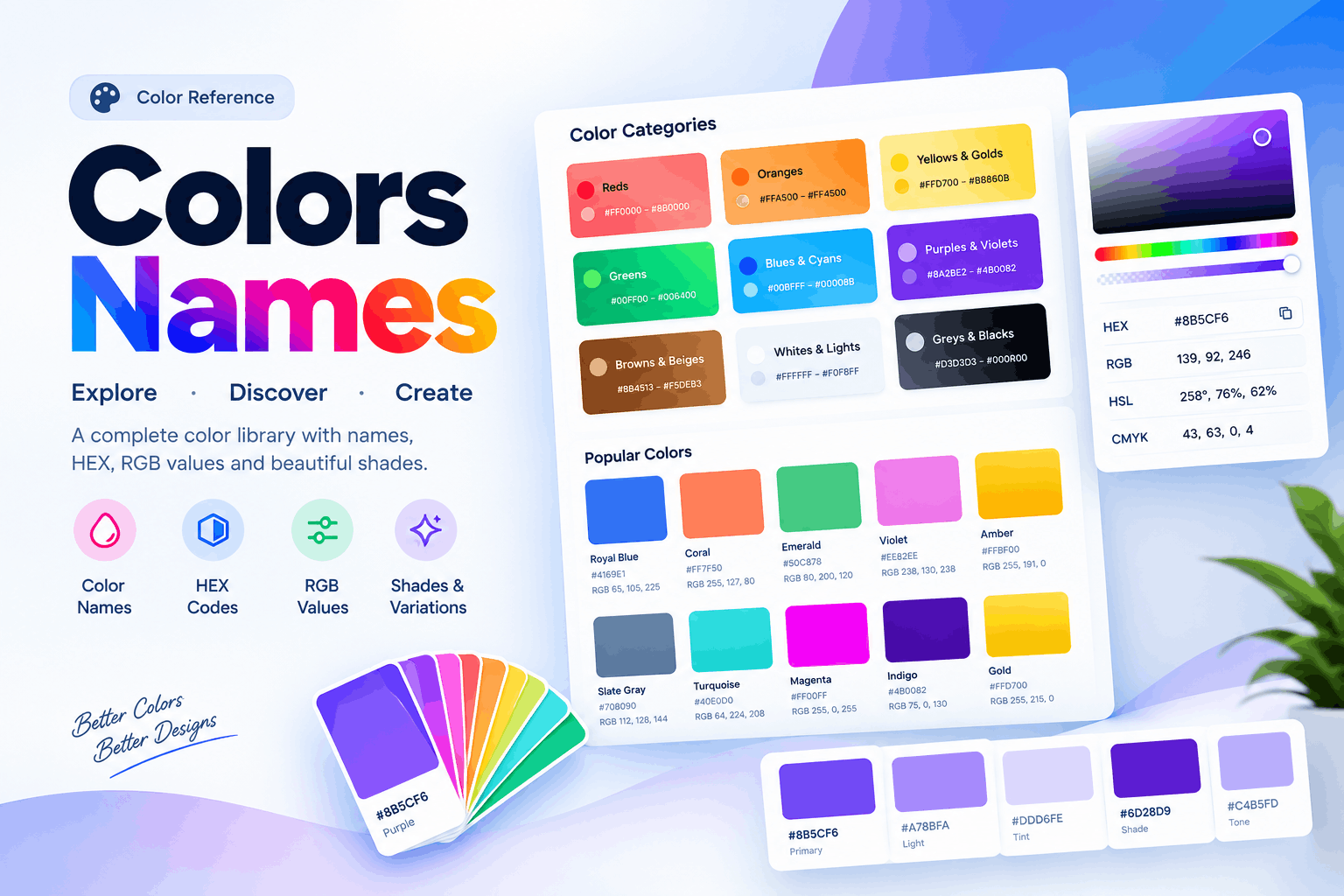
An organized color library—encompassing everything from common hues like red, blue, green, and yellow to distinctive shades such as brown, coral, crimson, lavender, beige, turquoise, and indigo, along with their intermediate tones—simplifies the process of selecting the right colors for designers and developers. You can explore a practical Color Names reference to browse colors, shades, and their exact values.
What Are Color Names?
Color names are terms used to describe and identify specific colors or various shades of color. Some of these names are used in everyday conversation, while others are derived from design systems, traditional materials, natural objects, gemstones, flowers, or digital color standards.
Additionally, for digital work, a name of the color can be related to:
- HEX color code
- RGB value
- HSL value
- HSV or HSB value
- CMYK equivalent
- Color family
- Shade or tone
- Visual preview
A name is great for humans to use but an exact value of color provides the perfect precision for designers and developers to use in the digital realm.
For instance, "use a blue" is quite vague. But a color being a specific HEX value with a name provides a pretty clear colour.
Explore Color Names by Color Family
Working with a professional color reference is far more manageable when the colors are divided into user friendly families. Instead of browsing through countless, unorganized swatches, jump straight to the color family you are interested in.
Common categories include:
- Reds – crimson, scarlet, coral, maroon, ruby, etc.
- Oranges – orange, amber, tangerine, peach, and warm tones.
- Yellows & Golds – yellow, lemon, mustard, gold, and cream-like tints.
- Greens – lime, apple, powder, emerald, mint, olive, forest, khaki, and all other greens.
- Blues & Cyans – colors that are shades of blue such as dark blue, light blue, turquoise, navy, teal, cyan and the like.
- Purples & Violets – purple, violet, lavender, plum, magenta, and the like.
- Browns & Beiges – browns, tan, beige, chocolate, caramel, and nature colors.
- Whites & Lights – white, ivory, snow, cream and very light shades.
- Greys & Blacks – all shades of black, carbon, charcoal, dark grey, darker neutral (charcoal), and silver.
It's a way to let users see colors by hue and still have it all be one database of colors.
Why Color Names Matter in Digital Design
Color relates to how people interpret and experience a digital interface. Colors can help establish hierarchy, segregate areas, emphasize actions, provide status, and support branding.
But selecting color names is no guarantee in implementation.
A professional workflow is a case when a public name is used together with corresponding technical values. For example:
| Color information | Purpose |
|---|---|
| Color name | Easy human identification |
| HEX | Common web and CSS value |
| RGB | Digital screen representation |
| HSL | Convenient color adjustment |
| CMYK | Useful for print workflows |
| Category | Organizes related colors |
| Preview | Provides immediate visual reference |
This makes a list of colors into a very useful tool for design.
Color Names and HEX Codes
Hex codes are common in websites and CSS because they are a concise way to write out colors in RGB.
For example, #FF0000 is a specific red and #0000FF is blue. Other more complex color shades are made up of varying combinations of red, green and blue channel values.
There's a valuable benefit to using a name, and a HEX value. One is for people to identify it, and the other for the computer to generate it.
A designer might use a description of color such as "deep blue" but the developer needs to know its precise HEX value in order to use the same color on a website.
Color Names and RGB Values
RGB is an acronym for: red, green, blue. It represents a colour in three numerical channels.
An RGB value is useful if you are working within a digital device, such as an image editing program, in CSS or in a developer tool. For this reason, a color will sometimes have its name, HEX and RGB equivalent.
Having these formats handy also makes color handoff between designers and developers way easier.
Shades, Tints, and Tones
Not all hue variations are distinct separate colors. The designer may keep the hue the same but create a couple different variations of that hue through changes in saturation and lightness.
A shade is essentially a color that is darkened. A tint is a lightened color, obtained by shifting to white. Tone typically refers to a color which has been toned down, meaning that gray has been added to it.
These variations are useful for:
- Website backgrounds
- Buttons
- Hover states
- Borders
- Cards
- Text
- Gradients
- Brand guidelines
- Illustrations
A good color library will communicate these relationships clearly, rather than treat each swatch as a random selection.
How to Choose the Right Color
Start with the purpose when selecting a color. Something bright is used successfully as an accent but would be overwhelming in a large background. A dark neutral color is appropriate for the text but not needed in the embellishments.
Consider these factors:
- Aim – Will help you to determine what message the color should deliver.
- Visualize – See how it pairs with other shades.
- Contrast – Ensure that foreground text and key controls are legible.
- Brand identity – Continue working along the visuals of the project.
- Audience – Think about how varied users will view the palette.
- Consistency – Stick to using approved colors instead of doing random iterations.
Color Testing in Final Design Versus on a Swatch It's Better to Test Colors in Final Design Than in Isolation.
Color Names for Website and UI Design
Web designers generally require just a few predetermined colours rather than the hundreds of varying shades.
A typical interface may define:
- Primary brand color
- Secondary color
- Accent color
- Background colors
- Surface colors
- Text colors
- Border colors
- Success colors
- Warning colors
- Error colors
- Hover colors
- Focus colors
- Disabled colors
Color names will be a huge help in documenting these systems. From here, developers can link the approved colors back to CSS variables, design tokens, or the global colors on your website.
So if you're developing for WordPress, Elementor, Woo Commerce, or custom websites where you'll use the same colors on lots of pages, this is especially handy.
Color Names for Branding and Graphic Design
Branding relies heavily on consistency. A company may use its main colors across its website, logo, social media, advertising, packaging, presentations, and printed documents.
A professional color library will record the exact values for the approved colors. Names can also speed up the internal discussion.
Instead of saying "the darkish blue from the homepage," your creative team can talk about a documented color name and find the exact value.
That small improvement can eliminate inconsistent color choices in your branding and graphic materials.
Color Names and Accessibility
Always consider accessibility when choosing colors. One color might look nice on the screen but create a readability problem with a certain background.
Always test important text and interface items for acceptable contrast. Attention should be paid to links, buttons, form items, icons, and interface states.
Color should not be the only way to communicate meaning. For example, an error message can include helpful text or another visual indicator instead of relying solely on red.
Accessible design should combine contrast, legible typefaces, clear text labels, understandable interface states, and color.
Names of Colors versus Custom Colors
Named colors are simple to identify and discuss. Custom colors are more flexible when a specific brand identity is needed.
| Named colors | Custom colors |
|---|---|
| Easy to understand | Very precise |
| Quick to communicate | Strong brand control |
| Good for reference purposes | Good for design systems |
| Likely familiar to users | Tailored for use in a project |
| Not always similar to a brand | Needs to be documented |
Many best practices use both: Use custom colors with names and write down their exact values.
Common Mistakes in Choosing Colors
Some problems diminish the usefulness of a color library:
- Selecting colors without seeing how they work together.
- Using too many unrelated shades.
- Ignoring contrast issues.
- Picking colors based purely on visual preference.
- Not writing down HEX or RGB codes.
- Using inconsistent colors across pages.
- Ignoring hover and focus states.
- Treating print and digital colors as the same.
- Using color by itself to communicate meaning.
A well-organized color reference helps solve most of these problems by ensuring all colors have a name and technical reference.
How to Build a Professional Color Library
A good color library organizes itself around real design requirements:
- Create a collection of core colors needed for the project.
- Group those into families of shades:
- Reds, oranges, yellows, greens, cyans, blues, purples, violets, browns, whites, light neutrals, greys, and blacks
- Record for each color:
- Name
- Color box
- HEX code
- RGB code
- HSL code (if relevant)
- Color family
- Use case
- Then test the colors against common backgrounds and interface elements, trim away excess duplicates, and keep the collection quick to scan.
You end up with a reference that is valuable for design, implementation, writing, and troubleshooting.
Frequently Asked Questions about Color Names
What are Color Names used for?
They are used to describe colors in a clear, descriptive, and recognizable way. Color Names are common in graphic design, web development, branding, digital arts, education, and speaking.
Are color names different from HEX codes?
Yes. Names describe what a color is while HEX codes tell you what a color is. Using both makes the conversation easier.
How many named colors are there?
No-one list contains all of the color names, and standards and terminology vary by country and industry.
What are the main color groups?
Common groupings include reds, yellows, oranges, greens, cyans, blues, purples, violets, browns, whites, beige, blacks, greys, neutrals, and light neutrals.
Can you use named colors in CSS?
Yes. CSS uses a predefined list of named colors; and designers can specify colors using HEX, RGB, HSL, and other values for higher precision.
Why include HEX and RGB values in a color library?
Names are open to interpretation, while precise values ensure accurate reproduction. HEX and RGB values help designers and programmers keep colors consistent.
Are colors important for branding?
Definitely! Clear consistent naming makes branding easier. Still, colors need to be specified and used consistently.
Conclusion
Color Names help you find, organize, select, and manage colors. When a collection pairs familiar names, color blocks, and precise codes, it becomes easy to work with in any profession.
Whether you want a warm red, a clean green, a professional blue, a gentle beige, a neutral grey, or an exact website hue, well-ordered categories speed up discovery; while HEX, RGB, and other codes give you the accuracy needed to use your chosen color.
For most projects, you should not aim to have the most colors but to choose a few specific hues and then create a clear system with a purpose, an applicable name, and an exact code.
A carefully maintained color file then supports branding, website production, typography, UI development, ecommerce design, illustration, animation, general design, and creative projects.
To browse colors by family and find their names, shades, HEX codes, and RGB values in one place, visit this Color Names library.